

The TradingView Sessions Indicator is one of the practical tools for traders who consider market timing as an important part of their analysis. Since global financial markets operate within different trading sessions, and each session has distinct behavioral characteristics and levels of liquidity, having access to a tool that clearly displays these time periods on the chart becomes highly important. In this article, by introducing the TradingView Sessions Indicator, its functionality, applications, and the role of this tool in improving time based analysis and more accurate decision making in trading are examined, so that traders can gain a better understanding of market conditions during different hours.
Market Timing in Trading and Its Importance
In financial market trading such as Forex , proper timing plays a key role in optimizing performance. The Sessions Indicator in TradingView, by separating trading sessions (Asia, Europe, America) on the chart, enables the trader to identify time zones with the highest trading volume and price volatility.
This information helps the trader determine optimal times for entering and exiting the market, set stop losses and targets more precisely, and make better use of trading opportunities during highly volatile sessions. As a result, using this indicator is considered an effective part of risk management strategies and increasing profitability.
Types of Session Indicators in TradingView
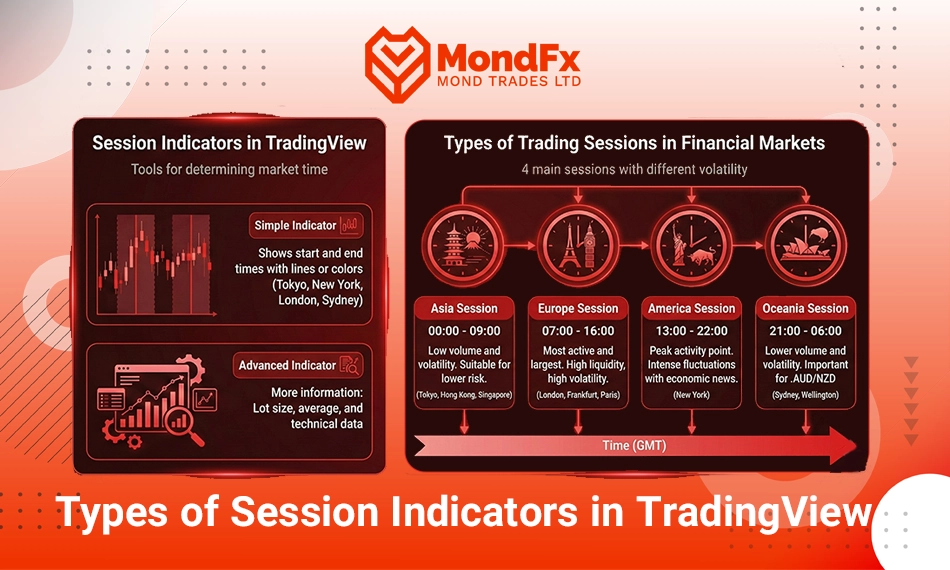
As you have noticed, the session indicator serves as a tool for determining the opening and closing times of major financial markets in order to achieve better trading performance. The types of session indicators in TradingView include:
Simple Indicators
Simple indicators in TradingView usually use vertical lines or different colors to display the opening and closing times of major financial markets, namely Tokyo, New York, London, and Sydney, on the price chart.
Advanced Indicators
Advanced session indicators, like simple indicators, display the opening and closing times of major financial markets, with the difference that these indicators provide traders with additional information such as lot size, averages, and other technical data.
Types of Trading Sessions in Financial Markets
In general, there are four major trading sessions in financial markets, each of which operates within a specific time range during a working day, with different levels of price volatility and its own particular news flow. These four trading sessions are:
Asian Session
The Asian Session (Asian Session) begins operating from 00:00 to 09:00 a.m. Greenwich Mean Time. The main markets in this session include Tokyo, Hong Kong, and Singapore.
The Asian Session generally faces lower trading volume and, consequently, lower volatility compared to other sessions, especially the European and American sessions.
The Asian Session is a very suitable market for those traders who are looking for lower risk opportunities or who prefer to enter a session with lower risk after the end of the working hours of another session. This is because the working hours of the Asian Session are such that the overall market trend is in the process of forming, and the groundwork for the market’s subsequent movements is being established.
European Session
The European Session (European Session) begins operating from around 07:00 a.m. to 16:00 on the same day, Greenwich Mean Time. The main markets of this session include London, Frankfurt, and Paris.
Among all other sessions, the European Session is considered the most active and the largest session in the Forex market. Trading volume in this session is the highest, and price volatility reaches its peak. The European Session is the best trading time for scalpers and day traders due to high liquidity and sharp price movements, and the main market trends are formed during this period.
American Session
The American Session (American Session), which is active from 13:00 to 22:00 Greenwich Mean Time, encompasses the New York market and is recognized as the peak point of daily activity in financial markets. This session is accompanied by the release of major U.S. economic news, corporate financial reports, and important economic data, which often lead to strong market volatility. Due to the importance of the U.S. market in the global economy, price behavior during this period is extremely vital for traders, and trading volume reaches its highest level at this time.
Oceanic Session
The Oceanic Session (Oceanic Session) is typically active from 21:00 to 06:00 a.m. Greenwich Mean Time. It includes the Sydney (Australia) and Wellington (New Zealand) markets. Compared to the European and American sessions, this session has lower trading volume and price volatility is usually lower, as liquidity during this period is more limited. However, this time frame is highly important for currency pairs related to the Australian dollar and the New Zealand dollar, where specific price movements can often be observed. This session is suitable for traders who are looking for calmer trading conditions or preparing for the start of the Asian session, and it usually provides opportunities to enter the market with lower risk.
| Session | Time (GMT) | Major Markets | Trading Volume | Characteristics | Key Notes |
|---|---|---|---|---|---|
| Oceanic | 21:00 – 06:00 | Sydney (Australia), Wellington (New Zealand) | Low | Low volatility, low liquidity, suitable for AUD and NZD pairs | Opportunities for calmer trading, start of Asian market activity |
| Asian | 00:00 – 09:00 | Tokyo (Japan), Hong Kong, Singapore | Medium | Start of Asian market activity, moderate volatility, Asian economic news releases | Foundation for market movements, preparation for the European session |
| European | 07:00 – 16:00 | London (United Kingdom), Frankfurt, Paris | High | Highest trading volume, strong volatility, European economic news releases | Best time for day trading, very high liquidity |
| American | 13:00 – 22:00 | New York (United States) | Very High | Peak of market activity, strong volatility, major U.S. economic news | Suitable for short term trading, most influential session on the market |
| Overlaps | 07:00 – 09:00 and 13:00 – 16:00 | Europe America, Asia | Very High | Highest liquidity and volatility, numerous trading opportunities | Highest risk and reward, main focus of professional traders |
How to Use and Configure the Session Indicator in TradingView
To add the Session Indicator to a chart in TradingView, first go to the Indicators section. Then, in the search bar, type Session or Market Sessions. After selecting the desired indicator, the time ranges related to major markets (such as London, New York, Tokyo, and Sydney) will be displayed on the chart in different colors.
In the settings section of this indicator, you can change the start and end times of each session. You can also customize the color of each market to make them easier to distinguish on the chart.
A very important point is that the chart’s Time Zone must be set correctly. Otherwise, the session times displayed will not match the actual market times. To set the time zone, simply go to the chart settings and select and adjust the Time Zone option.
Advantages and Limitations of the Session Indicator
The Session Indicator is one of the practical tools in technical analysis that helps traders identify the exact active times of global markets and manage their trades more accurately.
Among the key advantages of this indicator is the clear and visual display of different sessions (such as London, New York, and Asia), which leads to better identification of high volatility periods and potential trading opportunities.
However, the Session Indicator alone does not act as a decision making tool and does not generate buy or sell signals. For this reason, it is recommended to use it alongside other indicators such as Volume, the Relative Strength Index (RSI) , or MACD, in order to achieve more accurate analysis and more rational trading decisions.
Accurate Time Zone Configuration
One of the key points in using the Session Indicator is correctly setting the Time Zone on the chart. The operating hours of financial markets are usually announced based on Greenwich Mean Time (GMT), but for better alignment with geographical location or broker server time, it is necessary to select the chart’s time zone correctly.
If the chart’s time zone is not synchronized with the actual market time, sessions will be displayed at incorrect times, which may lead to misinterpretation in analysis and poor trade timing. It should also be noted that Daylight Saving Time (DST) changes can affect session schedules. Therefore, it is recommended to take these seasonal adjustments into account when configuring the chart, so that analyses remain accurate and aligned with real market time.
Related Resources and Indicators
To improve your time based analysis, you can use the following indicators as complements to the Session Indicator in TradingView:
Volume Profile: Displays trading volume at different price levels and helps identify strong support and resistance zones.
Session Volume: Shows trading volume for each session separately.
RSI, MACD, Stochastic: Used to confirm trends and entry and exit signals.
In addition, studying books and articles related to time management in trading and market psychology can broaden your perspective on the importance of timing in trading.
Conclusion
In conclusion, the TradingView Sessions Indicator is a simple yet powerful tool that helps traders gain a more precise understanding of the timing of global financial markets. By clearly displaying the Asian, European, American, and Oceanic sessions and highlighting their overlap periods, this indicator helps traders better identify major market volatility and trading opportunities. Intelligent use of this tool along with proper time zone configuration and combining it with other technical analysis indicators such as RSI, MACD, or trading volume can increase the accuracy of analyses and make risk management easier. Ultimately, the Session Indicator not only provides a clear view of market behavior but also enables traders to make better decisions and improve their overall trading performance.
If you are looking to start a reliable path in the world of trading, cooperating with the MondFx team can be a good starting point for building your personal strategy.